Help

Help

How to use VISON PAY

Instructions for VISON PAY

Easy
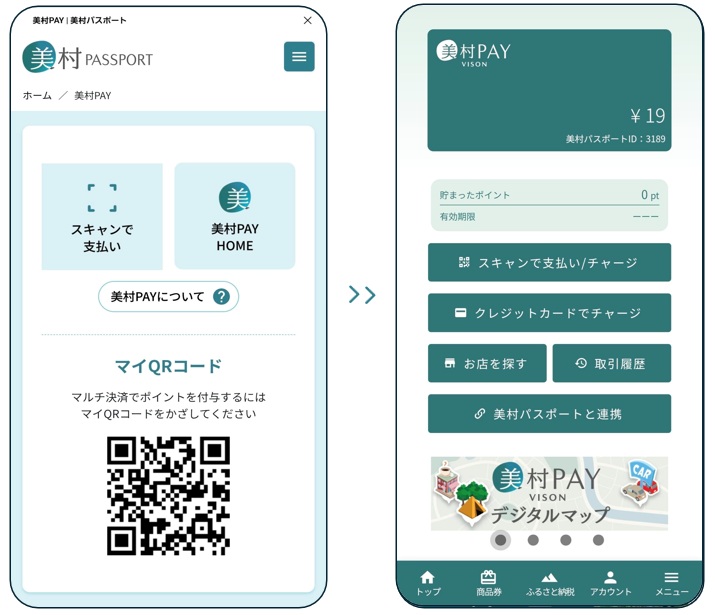
VISON PAY Launch

You can launch VISON PAY with a single tap from the VISON Passport menu, allowing for smooth and easy payments.

VISON PAY is a shared digital payment service accepted at participating stores across the VISON area (Taki Town, Odai Town, Meiwa Town, Watarai Town, Kihoku Town, and VISON).
You can make quick payments with your smartphone and earn points as you shop.

For detailed instructions on how to use VISON PAY, please tap the “About VISON PAY” button below.

Scan to Pay

Tap “Scan to Pay” to open the VISON PAY QR code scanner.

If you are using VISON PAY from VISON Passport for the first time, or if you have not used it for a long period, you may be required to log in.

VISON PAY Home

Tap “VISON PAY Home” to open the VISON PAY home screen.

If you are using VISON PAY from VISON Passport for the first time, or if you have not used it for a long period, you may be required to log in.

My QR Code

Use this when you want to earn points through multi-payment.
Multi-payment allows you to collect points even when paying with methods other than VISON PAY.

No matter how you pay cash, credit card, or VISON PAY you can earn points simply by having your QR code scanned.

Note: This feature is available only at stores that support multi-payment.